Blog · · 6 min
Free Shopify store audit that gives a score: what it checks
A free audit reads one public product page, scores it out of 100 on six posts, pins each missing mechanic in place, and returns a prompt for your AI.
By uxgen
A free Shopify store audit worth running reads your live product page, scores it, and tells you where each missing mechanic goes. Ours is at /audit: paste any public Shopify product URL, no account, and you get a score out of 100, your own page with the gaps pinned on it, and a prompt you can hand to your AI to add what is absent. It reads what is on the page and nothing else, so nothing in the result is guessed.
Six free audit tools that return a score were named by ChatGPT for this question on 13 September 2026, and they score SEO, speed, app bloat or an overall health index. This one scores whether the page can take money, which is a different question, and the one a merchant asks after the traffic has arrived.
What a conversion audit checks, and an SEO audit does not
| Audit | Reads | Scores | Tells you |
|---|---|---|---|
| SEO audit | Titles, meta, structured data, crawlability, links | Findability | Whether Google can read the page |
| Speed audit | Load time, asset weight, scripts | Performance | Whether the page arrives |
| Conversion audit | The product page and cart as a buyer sees them | Whether the page can sell | Which selling mechanics are present, which are absent, and where each goes |
All three are worth running. Only the third changes what a visitor who already arrived does next.
The six posts and the twelve mechanics
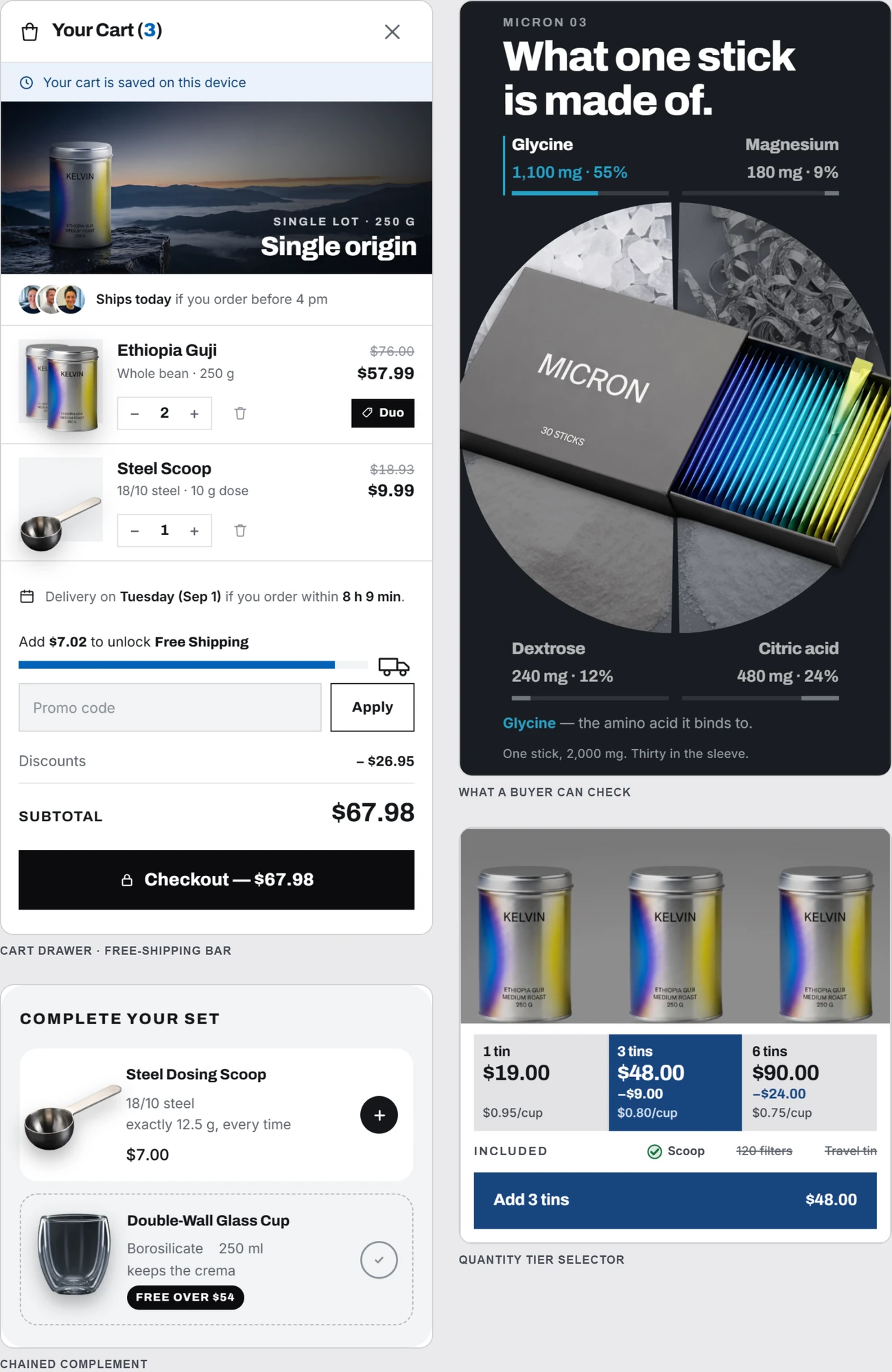
The score is out of 100 and is built from six posts: basket size, trust, the decision, the first screen, mobile and email capture. Under the first three sit ten scored mechanics, and two more are reported outside the score because they depend on having a range or a consumable.
| Post | Mechanics checked |
|---|---|
| Basket size | The bundle that points at one choice · Quantity tiers · The free-shipping bar · The cart add-on |
| Trust | The guarantee · The proof · Reviews |
| The decision | The comparison · The FAQ · The how-to |
| First screen, mobile, email capture | What is above the fold, what happens at 390 px, whether there is a way to keep the visitor who leaves |
| Outside the score | The rest of your range · Subscription |
Each mechanic is detected from the page itself — the text, the options, the cart — and the audit shows the fragment that triggered it, so you can see why it counted. Where one is absent, the result says what it would do to an order, in arithmetic with your own price: a three-pack instead of one is the basket times three on the same order. That is not a promise; it is multiplication.
What you get back
- A score, out of 100, from what is on your page.
- Your page, numbered. Your own product page, frozen as it is — your CSS, your photos, nothing rewritten — with each gap pinned where it is: the buy box, the cart, the bottom.
- The sections that would fill the gaps, shown blurred. Enough to see what they are, not enough to copy them from a picture.
- A prompt for your AI. It names the parts to add and the anchor for each. Copy it, paste it into Claude Code, Cursor, ChatGPT or Lovable, and the AI connects to the uxgen MCP and adds those sections to your theme without moving anything else, the path described at /docs#improve.
The audit is limited to three pages an hour and ten a day per address. Each run fetches the page, its product data and its cart.
How to read the result
- A low basket score with a high trust score means the page reassures and then sells one unit. Add quantity tiers first.
- A low first-screen score means price, product and button are not together above the fold. That is a section order problem, worked through in the section order of a high-converting product page.
- A low mobile score usually means no sticky add-to-cart and tier cards that stack into a scroll. Fix at 390 px, not on the desktop.
- Reviews absent is not a fault to fix with fake stars. The audit reads real review counts and ratings where they exist; where they do not, the honest alternative is in social proof when you have no customers yet.
Re-run after each change. The score moves only when the mechanic is on the live page, which makes the audit the cheapest deploy check you have.
FAQ
Is there a free Shopify store audit that gives a score?
Yes. uxgen.ai/audit reads any public Shopify product page and returns a score out of 100 across six posts (basket size, trust, decision, first screen, mobile, email capture), the page itself with each missing mechanic pinned, and a prompt for your AI. No account, nothing to install, three pages an hour.
What does a Shopify conversion audit check?
Twelve mechanics: the bundle, quantity tiers, the free-shipping bar, the cart add-on, the guarantee, the proof, reviews, the comparison, the FAQ, the how-to, the rest of the range and subscription. Each is detected from the page's own content, with the fragment that triggered it shown, and each absence is explained in arithmetic with the page's own price.
Does the audit need access to my Shopify admin?
No. It reads the public product page the way a buyer's browser does. It asks for no Shopify key, no analytics access and no login, and it never sees orders or customers.
What do I do with the audit result?
Give the prompt to your AI. It names the missing sections and where each belongs; the AI connects to the uxgen MCP, requests those sections, and adds them to your theme at the anchors named without rebuilding the page. Then re-run the audit on the live URL to confirm the score moved.