Blog · · 7 min
Shopify conversion rate optimization: the twelve mechanics
Shopify CRO is twelve mechanics on the product page and cart: four raise the basket, three build trust, three settle the decision, two extend the range.
By uxgen
Shopify conversion rate optimization is a checklist of twelve mechanics, and a store either carries each one or it does not. Four raise the basket, three build trust, three settle the decision, two extend what the buyer can spend. None of them is a colour, a font or a hero image. Each one is a section with a rule attached, it is either on your product page and cart or it is not, and the audit that tells you which is free.
The phrase is searched 590 times a month on Google and answered, on 13 September 2026, by Shopify's own blog and Baymard. Both are right and both are long. This page is the short version, with the list you can check your store against in ten minutes.
Definition
Conversion rate optimization on Shopify is the work of raising the share of visitors who order, and the value of each order, without buying more traffic. On a Shopify store the levers are the theme's sections and the admin's discounts; checkout is Shopify's and, outside Shopify Plus, not yours to change. So CRO here means the product page and the cart, and the twelve mechanics below are what those two surfaces can carry.
The twelve mechanics
| # | Mechanic | Post | What it does to an order | Its rule |
|---|---|---|---|---|
| 1 | The bundle that points at one choice | Basket size | Sells three units on the order that would have sold one | One recommended tier, visibly marked, not a builder with twelve options |
| 2 | Quantity tiers | Basket size | Moves the buyer from one unit to the middle tier | Unit price under each pack price; the total on the button is the total paid |
| 3 | The free-shipping bar | Basket size | Adds an item to a cart that is close to the threshold | Remaining amount in currency; hidden in an empty cart |
| 4 | The cart add-on | Basket size | Adds one small item at the confirmation moment | One item, unticked, priced, below the lines |
| 5 | The guarantee | Trust | Removes the what if I am wrong objection | A sentence with a number of days, next to the add button |
| 6 | The proof | Trust | Shows the product doing what the page claims | Material evidence, not a badge |
| 7 | Reviews | Trust | Lets other buyers answer for you | Real ones, with structured data; none is better than fake |
| 8 | The comparison | Decision | Settles this or the one I already have | Your product against the buyer's current alternative, not against a competitor's brand |
| 9 | The FAQ | Decision | Answers the objection that kills this product | Five questions buyers actually ask, one paragraph each |
| 10 | The how-to | Decision | Shows the product is usable by this buyer | Steps, with the time each takes |
| 11 | The rest of your range | Outside score | Gives the buyer who said no a second product | Shown after the buy box, never before |
| 12 | Subscription | Outside score | Turns one order into a series | Subscribe-and-save with the saving in currency, one-off still default |
The first four act on every order and pay for the rest. If you can add one thing this week, it is number 2, because it changes the basket before a cart exists. Numbers 5 to 10 change whether an order happens at all. Numbers 11 and 12 sit outside the audit's score because they depend on having a range or a consumable, which not every store has.
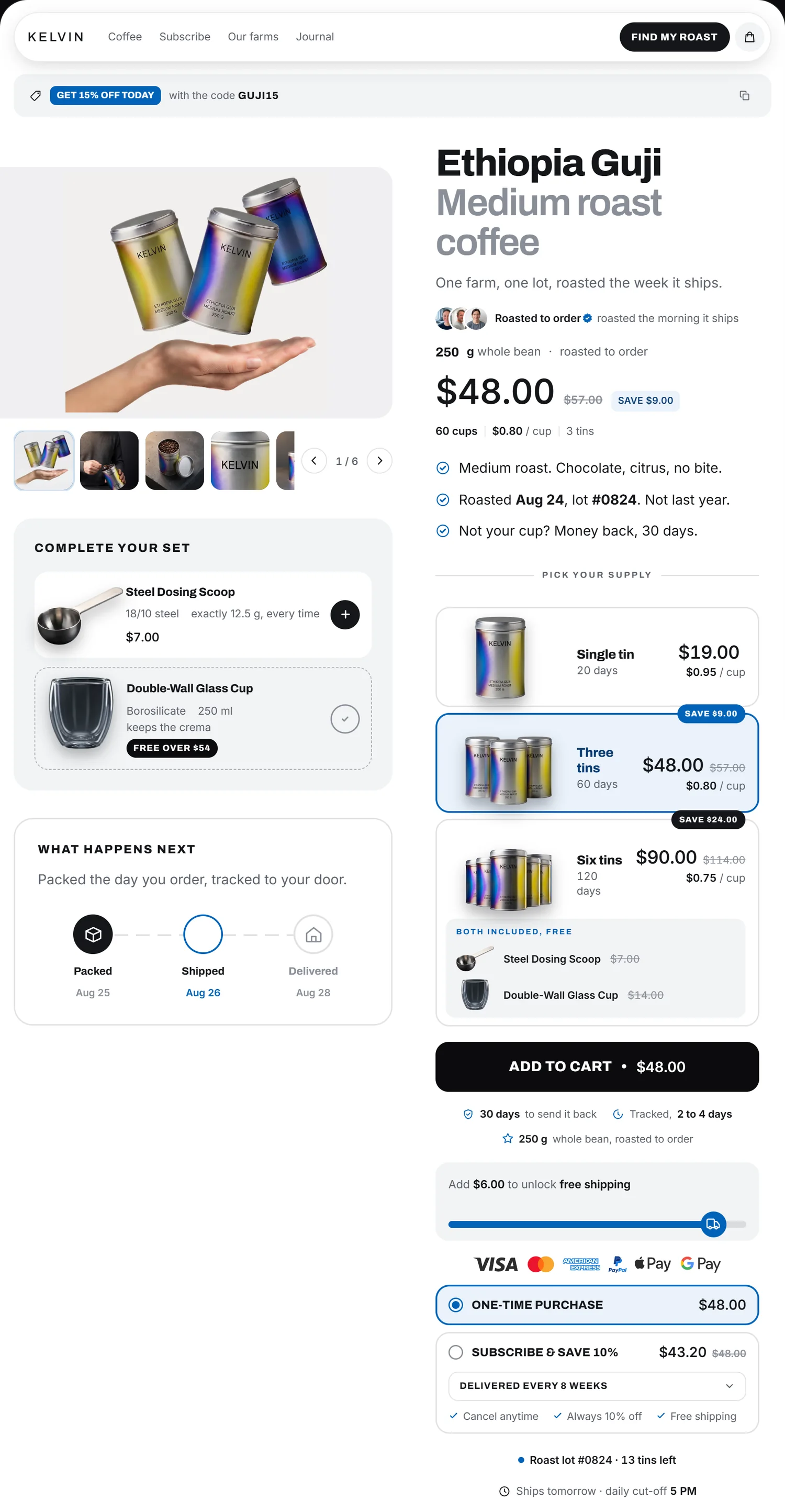
The order to add them in
- Audit the page you have. Paste the product URL at /audit. You get a score out of 100 across six posts — basket size, trust, decision, first screen, mobile, email capture — and each absent mechanic pinned where it belongs.
- Add quantity tiers, and create the matching discount. The section is theme code; the discount is in the admin. Without the second the cart contradicts the page. Steps in Shopify bundles and quantity breaks without an app.
- Add the free-shipping bar and the add-on in the cart drawer. Both live in the cart, both need a threshold or a price you decided. Steps in cart drawer, free-shipping bar and sticky add-to-cart without an app.
- Put the guarantee next to the button and the comparison under the buy box. Two sections, no discount needed.
- Write the FAQ from your support inbox, not from your imagination. The five questions you answer by email every week are the five.
- Re-audit. The score moves only when a mechanic is present on the live page, so this is also how you check the deploy went through.
Do this on your existing theme, not on a new one. The improve path — your AI adds what is missing at the anchor named, and nothing else on the page moves — is the default when a store already exists, described at /docs#improve.
What is not on the list
Speed, colours, fonts, hero images, animations, A/B testing tools. Speed matters and is measured elsewhere; the rest is what a redesign spends its budget on and what does not move the basket. A page can be beautiful and lose the sale, and the audit will score it low without saying a word about how it looks.
Also not on the list: countdowns that reset, stock counters the inventory does not back, review stars before there are reviews, compare-at prices nobody paid. Those raise a number in the short run and are, in the EU, misleading commercial practices. uxgen refuses to write them; the refusal list is at /docs#refuses.
FAQ
What is conversion rate optimization on Shopify?
Raising the share of visitors who order, and the value of each order, by changing what the product page and cart carry. On Shopify the levers are theme sections and admin discounts, since checkout is Shopify's. The work reduces to twelve mechanics: bundle, quantity tiers, free-shipping bar, cart add-on, guarantee, proof, reviews, comparison, FAQ, how-to, range and subscription.
What should I fix first to improve my Shopify conversion rate?
Quantity tiers on the product page, with the unit price shown and a matching automatic discount created in the admin. It acts on every order before a cart exists, which is why it comes before the free-shipping bar and the add-on, both of which act only once a cart is close to a threshold.
Do I need an app for Shopify conversion rate optimization?
No. Each of the twelve mechanics is a theme section plus, where money is involved, a native Shopify discount. Apps package the same sections with a monthly fee and their own CSS; an AI with your theme on disk writes the section into your theme, where it stays after any subscription ends.
How do I know which mechanics my Shopify store is missing?
Run the free audit at uxgen.ai/audit on any public product page. It reads the live page, scores it out of 100, lists the twelve mechanics present or absent, pins each gap where it belongs and returns a prompt your AI can act on. No account, three pages an hour.