Blog · · 7 min
Cart drawer, free-shipping bar, sticky add-to-cart: no app
All three are theme code: a drawer fed by the Cart AJAX API, a free-shipping line computed from the cart total, a sticky bar on the product page. No app.
By uxgen
A cart drawer, a free-shipping bar and a sticky add-to-cart are three sections in your theme, and none of them needs an app. The drawer is a section that reads the cart through Shopify's Cart AJAX API and opens on add-to-cart instead of navigating away. The free-shipping bar is a line inside it that shows the amount still missing, in currency, computed from the cart total against a threshold you set. The sticky bar is a strip on the product page that keeps the price and the button reachable once the buy box scrolls off a phone screen. Your AI writes all three into sections/ and snippets/; you set two numbers.
The search results for these three, measured on 13 September 2026, are app store listings and forum threads. Many themes ship a drawer; the bar with the remaining amount and the sticky strip with the price on it are the two to check for. This is the pattern for each, and the order to build them in.
The three, side by side
| Mechanic | Lives | Reads | Needs from you | Acts on |
|---|---|---|---|---|
| Cart drawer | Every page, opened on add-to-cart | /cart.js via the Cart AJAX API | Nothing | Every order: the buyer sees the basket without leaving the page |
| Free-shipping bar | Inside the drawer, above the lines | cart.total_price against your threshold | The threshold, in currency | Orders already above roughly 40% of the threshold |
| Sticky add-to-cart | Product page, mobile, after the buy box scrolls out | The selected variant's price and availability | Nothing | Every mobile session |
Build them in that order. The drawer is the container; the bar is a line in it; the sticky strip opens the drawer when tapped, so it comes last.
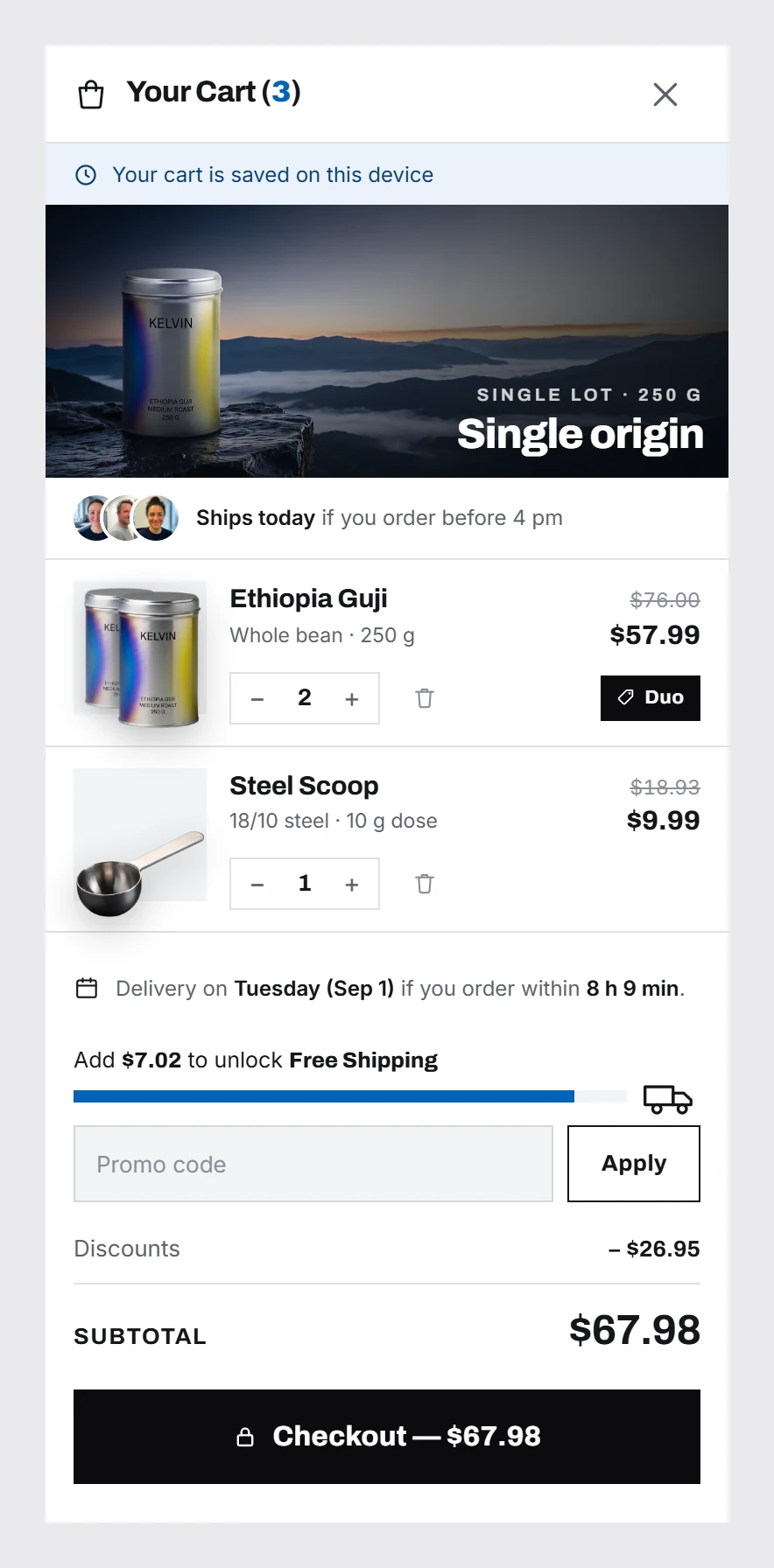
1. The cart drawer
- Check whether your theme already has one. Dawn ships a drawer under a setting (cart type: drawer), and many themes follow it. If it exists, keep it and go to step 2 of the bar; you are adding a line, not a drawer.
- If not, add
sections/cart-drawer.liquidrendered fromlayout/theme.liquid, hidden by default, with the cart lines, each line's own quantity stepper, the subtotal and a checkout button that posts to/checkout. - Intercept the add-to-cart form. Submit it with
fetch('/cart/add.js'), thenfetch('/cart.js')for the new state, re-render the drawer's lines, open it. No page navigation. - Make the free-shipping threshold a section setting in the
{% schema %}, so the merchant changes it in the theme editor rather than in code.
The component in full, with the states it needs (empty, one line, quantity change, remove, error), is in a cart drawer component, in full; that one is React, and the Liquid version follows it line for line.
2. The free-shipping bar
One sentence, recomputed on every cart change: $6.00 to unlock free shipping. In Liquid, with the threshold from the section setting (Shopify prices are in cents, hence the times: 100), re-rendered after each /cart/add.js through the Section Rendering API (/?sections=cart-drawer):
{% assign remaining = section.settings.threshold | times: 100 | minus: cart.total_price %}
{% if cart.item_count > 0 and remaining > 0 %}
  <p class="ship-bar" aria-live="polite">{{ remaining | money }} to unlock free shipping</p>
{% elsif cart.item_count > 0 %}
  <p class="ship-bar">Free shipping unlocked.</p>
{% endif %}
Three rules the snippet enforces. It renders nothing in an empty cart, because a threshold announced before anything is chosen is a price objection you raised yourself. It shows an amount in currency, never a percentage, because the buyer compares it against a price on the page. It stops when the goal is met and says so once. The threshold itself is arithmetic, not a round number: your shipping cost divided by your gross margin rate, added to your median order, worked through in free shipping threshold bar.
And create the matching free-shipping discount in the admin — Shopify's native free-shipping discount type, automatic, with the same minimum. The bar promises; the discount delivers.
3. The sticky add-to-cart
- Add
snippets/sticky-atc.liquid, rendered at the end of the product template: the product name, the selected variant's price, and one button. - Show it only when the buy box has left the viewport. An
IntersectionObserveron the main add-to-cart form toggles a class; no scroll listener. - Keep it in sync with the variant selector. When the variant changes, rewrite the price and the availability in the strip, or the strip sells a variant that is out of stock.
- Tapping it opens the drawer, through the same
/cart/add.jscall as the main form. - Size it at 390 px: one row, price left, button right, 44 px tall, above the phone's home indicator.
What goes wrong is in sticky add to cart on mobile: a strip that covers the last line of the page, a strip that appears at the top of the page before the buy box has been seen, a strip with the button and no price.
When the app is still the right answer
When the drawer has to talk to a subscription engine, a loyalty programme or a gift-with-purchase rule that lives in an app's database, the app's own drawer is the one that knows those rules. For the three mechanics above, on a store where the cart is Shopify's cart, the theme is enough and it is yours. The general case — which apps to replace with code and which to keep — is in replace Shopify apps with code you own.
Whether your store already has these three is one of the things the free audit at /audit reads: the free-shipping bar and the cart add-on are two of the four basket mechanics it scores, and whether the buy button is visible without scrolling at 390 px is in the mobile post. If your AI is connected to the uxgen MCP, the drawer and the bar are among the 172 store sections it can request as HTML and port to Liquid, in your theme's grammar, without touching the rest of the page — the improve path at /docs#improve.
FAQ
How do I add a cart drawer to Shopify without an app?
Check the theme first: Dawn and many themes have one under the cart type setting. If yours does not, add a sections/cart-drawer.liquid rendered from the layout, intercept the add-to-cart form with fetch('/cart/add.js'), reload the state with /cart.js, re-render the lines and open the drawer. No navigation, no app.
How do I add a free shipping bar to Shopify without an app?
A few lines of Liquid inside the cart drawer: subtract cart.total_price from your threshold, and if the cart is not empty and the remainder is positive, print the remainder with the money filter followed by to unlock free shipping; when the remainder reaches zero, print Free shipping unlocked. Make the threshold a section setting, and create the matching native free-shipping discount in the admin.
How do I add a sticky add to cart button on Shopify without an app?
A snippet at the end of the product template with the product name, the selected variant's price and one button, shown by an IntersectionObserver once the main buy box leaves the viewport, kept in sync with the variant selector, and wired to the same /cart/add.js call as the main form so it opens the drawer.
Should the free shipping bar show a percentage?
No. The buyer needs a number they can compare against the price of something on the page, and $6.00 to go is that number. A percentage is a second calculation, and a bar with no figure tells them something is incomplete without saying what completes it.