Blog · · 7 min
Improve an existing Shopify store with AI, no rebuild
Keep the page. Audit it, let your AI inherit the theme, add only the mechanics the audit names at the anchor it names, and read a per-section diff first.
By uxgen
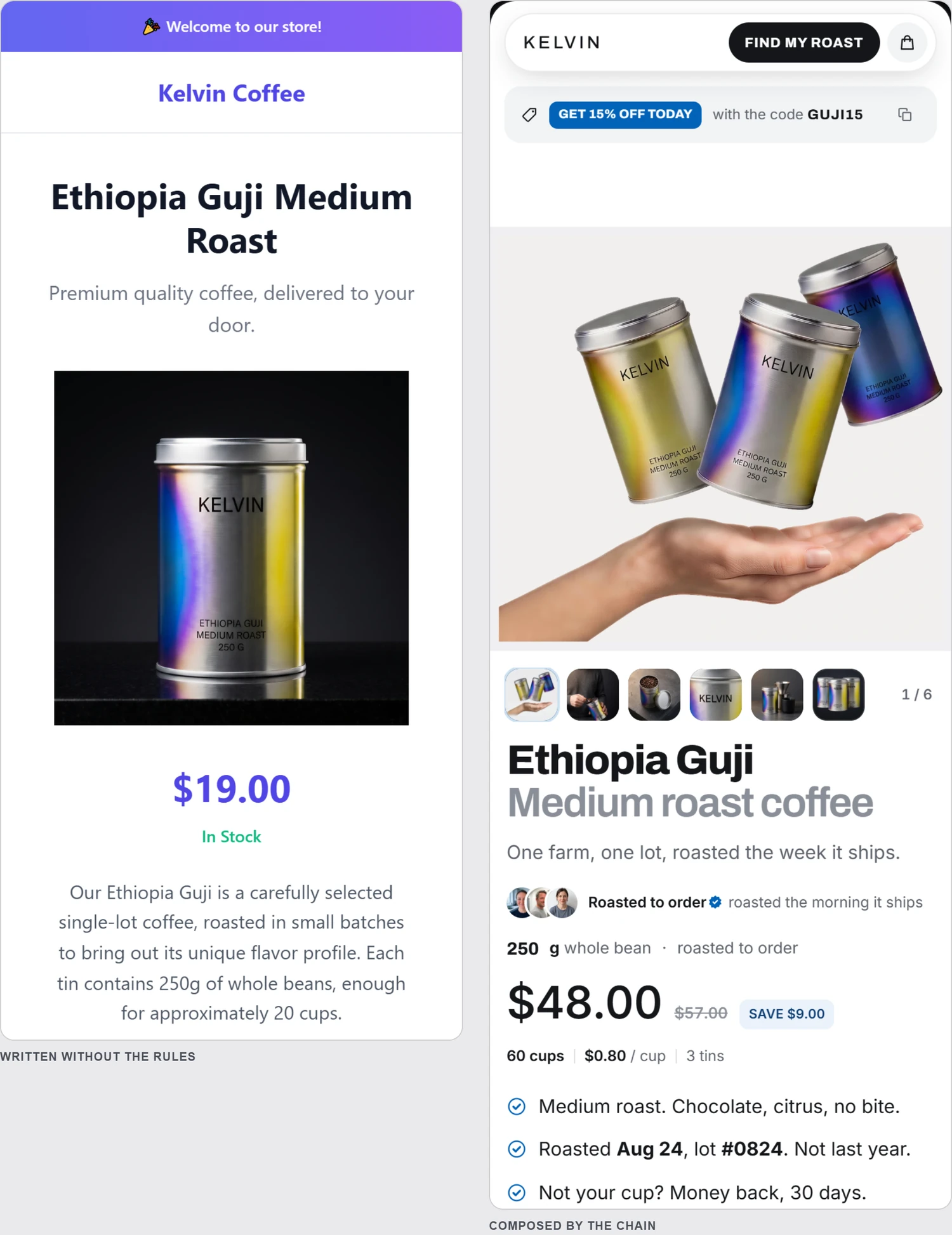
Improving an existing Shopify store with AI means adding what the page lacks and moving nothing else. The theme you chose, the photos you paid for, the copy you rewrote four times: those stay. What changes is a short list of sections the page never had — a quantity tier under the buy box, a guarantee beside the button, a free-shipping line in the cart — each inserted at a named anchor, in your theme's own fonts and colours, with a diff you read before anything goes live.
The other answer to this question, the one ChatGPT gives on 13 September 2026, is Shopify Magic for copy, Sidekick in the admin, and apps. Copy and apps are fine. Neither one puts a tier selector where your buy box is, and that is the kind of gap the audit finds.
Improve or rebuild
| Improve | Rebuild | |
|---|---|---|
| Your theme | Inherited: fonts, radii, grounds become the grammar | Replaced |
| Your sections | Kept, in the order they are | Re-laid |
| What the AI adds | Only what the audit names absent, at the anchor it names | The whole page |
| What you review | A per-section diff: kept / changed / added | A new page |
| When | You have a store that works and converts less than it should | You have no store, or you asked for it in those words |
| Risk | One section wrong, in one place | The page you knew is gone |
Improve is the default. The rule, as the uxgen MCP applies it to every session: if the merchant already has a store, never rewrite their page; inherit the theme, add only what the audit names missing, at the anchor it names, and show a per-section diff before publishing. Rebuild only when asked for in those words. The rule is written out at /docs#improve.
The steps
- Audit the live page. Paste the product URL at /audit. No account. You get a score out of 100, each missing mechanic pinned where it belongs — the buy box, the cart, the bottom — and a prompt.
- Pull the theme to disk.
shopify theme pull --store your-store.myshopify.com, into a folder. Work on a duplicate of the live theme if you want a safety net. - Open the folder in your AI — Claude Code, Cursor, or ChatGPT and Lovable through their connectors — and connect the uxgen MCP:
claude mcp add --transport http uxgen https://www.uxgen.ai/mcpfor Claude Code, a JSON block for the others, listed at /docs#install. - Paste the audit's prompt. It opens with I run the Shopify store behind this product page and your URL, which selects improve mode, and it tells the AI to keep your photos, prices, colours and words; the AI passes your current page as the theme to inherit, runs the audit in conservation, and receives only additive gaps with their anchors.
- Read the diff. Before anything is written, each section of your page is marked kept, changed or added. If a section you did not ask about is marked changed, stop and say so.
- Preview at 390 px with
shopify theme dev, on a phone. - Push unpublished, publish from the admin, re-audit. The score moves only when the section is on the live page.
Seven steps, and the page you had is intact at every one of them.
What gets added, typically
The audit checks twelve mechanics. On an existing store, check the four that act on basket size first, because a stock theme such as Dawn does not ship them as sections: the bundle that points at one choice, quantity tiers with a unit price, the free-shipping bar with the remaining amount in currency, and the cart add-on. The trust and decision mechanics — guarantee, proof, reviews, comparison, FAQ, how-to — a theme can carry as generic sections; when one is present but far from the buy box, the improve path moves nothing, and it comes back as an anchor suggestion for you to act on by hand.
Where money is involved the section is half the work. A tier that reads 3 for $48 needs an automatic discount in the admin that makes the cart charge $48, or the page contradicts the cart. The step list for that pair is in Shopify bundles and quantity breaks without an app.
What improve refuses to do
It does not repaint grounds, change radii, re-centre a header, add animations, or reorder sections. Those are rebuild moves, and the audit in conservation mode does not report them at all, so the AI never sees a reason to make them. It does not touch checkout, which is Shopify's. And it does not write the fabricated mechanics — resetting countdowns, stock counters the inventory does not back, review stars with no reviews — because uxgen refuses them at the source, listed at /docs#refuses.
If what you want is a different store, say rebuild and the construction path opens. If what you want is the store you have, selling more of what it already sells, this is the path, and step one costs nothing.
FAQ
How do I improve my existing Shopify store with AI without rebuilding it?
Audit the live product page first (uxgen.ai/audit, free, no account), pull the theme to disk with shopify theme pull, open it in your AI with the uxgen MCP connected, and paste the audit's prompt. Improve mode is selected by the prompt's first line, which names the store you already run: the AI inherits your theme, adds only the sections the audit named absent at the anchors named, and shows a per-section diff (kept / changed / added) before anything is written.
Will the AI change my theme's design?
Not in improve mode. Your fonts, radii and grounds are read from your page and become the grammar the added sections follow. Grounds, radii, header layout, animations and section order are rebuild moves, and the audit in conservation mode does not report them, so the AI has no instruction to make them.
What does an AI usually add to an existing Shopify store?
The basket mechanics, because a stock theme such as Dawn does not ship them as sections: a bundle that points at one choice, quantity tiers with the unit price shown, a free-shipping bar with the remaining amount in currency, and a single cart add-on. Each is a section file with a preset, placed at a named anchor such as after the buy box or in the cart drawer.
Can I do this with ChatGPT or Cursor instead of Claude Code?
Yes. The MCP is remote and the same for all four clients. Claude Code takes one command line; Cursor takes a JSON block in ~/.cursor/mcp.json; ChatGPT takes the server URL in developer mode; Lovable takes it under Connectors. The audit prompt and the improve rule are identical whichever one you paste it into.