Blog · · 7 min
How to give AI design taste
With material, not adjectives. A taste skill such as impeccable, Anthropic's frontend-design or UI/UX Pro Max moves the output by forbidding known defaults, 59 deterministic detectors in impeccable's case. A real reference image moves it further, and almost nobody supplies one.
By uxgen
Taste transfers in two layers, and most people install the first and skip the second.
Layer one is a rule that forbids. A skill that bans this font, that gradient, one radius everywhere, bounce easing. It works because a model's failures are repetitions, and a deterministic rule catches a repetition far more reliably than a critique prompt does.
Layer two is material that inspires. An actual reference. A screenshot of a page you admire, a photograph of the product, a palette lifted from the object rather than from a habit. This layer moves the output considerably further than the first, and it is the one almost everyone omits, because "make it look good" is easy to type and a reference image is work to find.
Adjectives are neither layer. "Modern", "clean", "premium" and "minimal" are the four words that produce the median result, because they describe the median of the corpus. They are not instructions; they are a request for the default.
Layer one, what actually installs
Read from their public repositories on 24 August 2026. This is documentation, not a benchmark. We have not run a controlled comparison and will not pretend to.
impeccable. npx impeccable install. Apache-2.0, published by Paul Bakaus, version 3.6.0. Its README describes 59 deterministic detector rules plus LLM-only critique checks, and 23 commands under /impeccable <command>: init, craft, critique, audit, polish, bolder, quieter, distill, typeset, colorize, animate, layout, clarify and more. The detectors target overused fonts, problematic colour combinations and bounce easing, which is exactly the class of failure a rule handles well.
The step people skip is impeccable init, which writes a PRODUCT.md and offers a DESIGN.md so later commands know the audience, the brand lane, the voice, the anti-references, the colours and the type. That file is layer two in text form, and running the detectors without it is running half the tool.
Anthropic's frontend-design skill ships with Claude Code and is the baseline. Whatever else you add, this is what you are adding to.
UI/UX Pro Max carries genuine search demand, 3,600 searches a month with a competition index of 6, from Google Ads data pulled 24 August 2026. It is distributed through the Claude Code marketplaces.
The distribution layer matters too. npx skills add <repo> (Vercel Labs' skills CLI, MIT) installs skills from a repository into Claude, Cursor, Cline and others. Half the install instructions you will read route through it.
None of the three is a commerce tool. They will make a store page look considered and will not tell you where the upsell goes.
Layer two, and why it is the one that counts
A model asked for a page with no reference returns the centre of its corpus. Give it a real image and it has somewhere else to converge.
The product photograph outranks every design decision. If the merchant sells a physical object and the page shows a generated render, no amount of typography rescues it. The page reads as a page about a hypothetical product. Two views of the same real object, under different light, is the single most effective change available. It is also the one no skill can produce for you.
A palette taken from the material. Name the darkest point in the actual photograph and build outward from it. Colour that comes out of the object is coherent by construction; colour picked from a preference is coherent only by luck, and the model's preference is a violet gradient.
Anti-references, written down. "Not like this" is a stronger constraint than "like this", because it removes a region of the space rather than gesturing at a point in it. impeccable's DESIGN.md has a field for this. Use it.
A real screenshot in context. A reference image pasted into the conversation constrains far more than a description of that image. If the merchant admires a specific store, put the screenshot in front of the agent.
How to check it worked
The check is the part that separates this from an opinion, and it is simple.
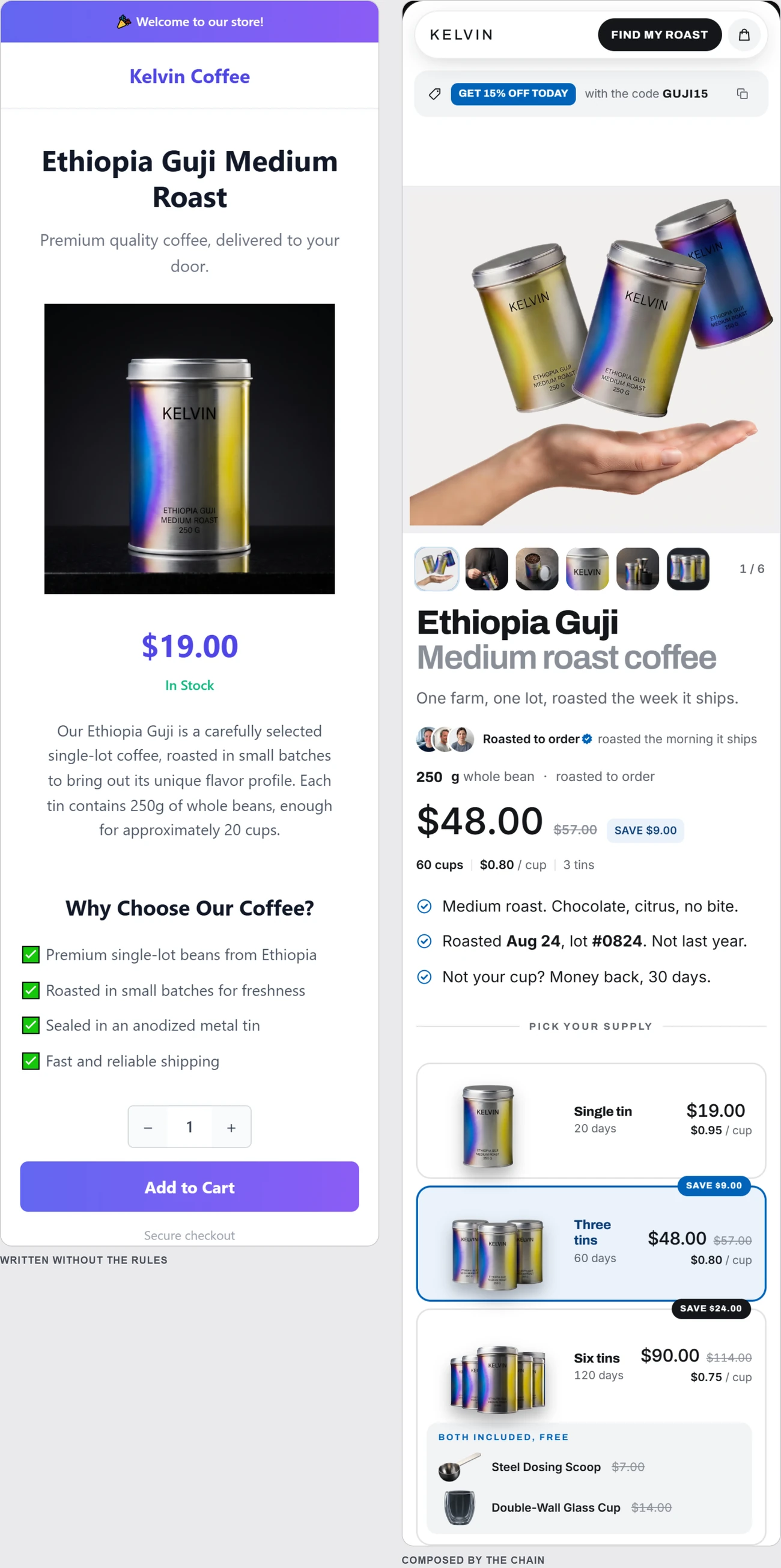
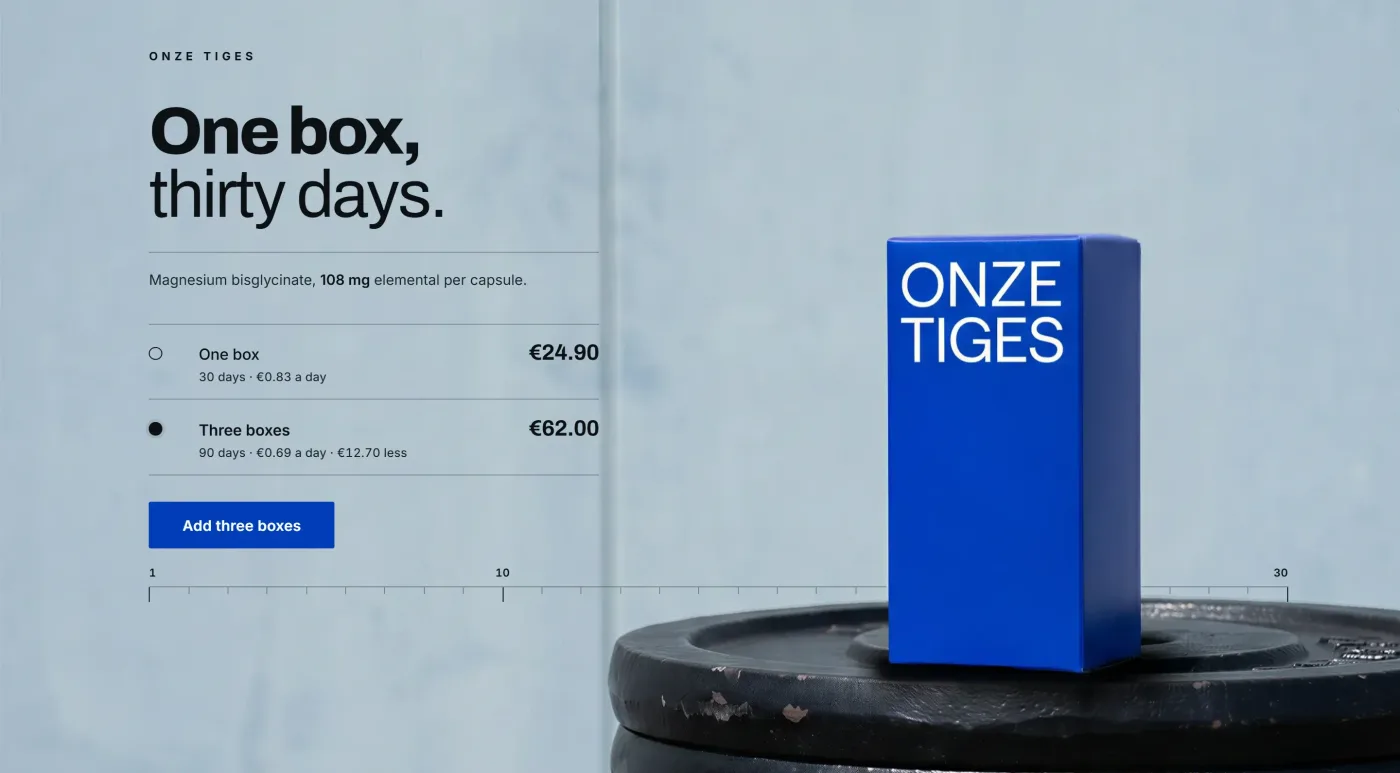
Generate the same brief twice (once bare, once with layer two) and put the two screenshots side by side. If you cannot tell them apart at a glance, layer two did not land, and no amount of further prompting will change that.
Look at the render, not the diff. A design fault is visible in a screenshot in one second and invisible in a code review for an hour. npx chrome-devtools-mcp@latest lets an agent load the page in real Chrome and look at it; the measurement family is inventoried here.
Check at 390 pixels, first. Most traffic is there, and most layout faults surface there first. A design that only holds at 1440 has not been designed.
Run the deterministic pass last, not first. /impeccable audit on a finished page tells you which known defaults survived. Run before the page exists and you are auditing an intention.
The trap in the middle
There is a failure mode that looks like progress. Iterating on a score. A design auditor returns a number, you push the number up, and past a point you are optimising the metric rather than the page. The score rises while the page gets worse, because you are now writing for the detector. Use a rule engine to find faults, not to grant permission. The decision to ship is a decision you make after looking at the screenshot.
And be clear about the ceiling. A taste layer keeps a page out of the tell. It does not make the page sell. That is a different set of decisions, and the ones that cost money when they are missing are listed here.
Disclosure. We are building uxgen, an MCP that supplies layer two to a coding agent. It is not installable yet; layer one is, today, from the links above.
FAQ
Can you actually give an AI agent design taste?
You can move its output reliably, in two layers. A rule layer forbids known defaults, and a material layer supplies something to imitate. Most people install the first and skip the second, which is why the results plateau.
Does a design skill work better than a prompt?
Yes, because it is loaded consistently rather than remembered occasionally, and because the deterministic parts of some skills run outside the model entirely. A prompt is advice; a detector is a measurement.
What is the material layer?
A real reference. A photograph, a texture, a captured screen, a second angle of the same object. A rule that forbids indigo does not tell the model what to use instead, and no rule set can generate matter.
How do I know the taste layer changed anything?
Run the same prompt with and without it and diff the code. Changed hex values and radii mean it moved the surface. Changed structure and hierarchy mean it moved something that matters.